Monday, May 18, 2026
Welcome, Guest
Username: Password: Remember me

TOPIC:

Importing other tracks into DTR2! 1 year 1 week ago #75603

No, no..... Already paid for... It was only 300, not 3,000 thankfully. It was a good deal. I needed a new PC anyway... 18 years is like an accident waiting to crash...., says Sam... All good my friend..... Just need to hook things up and that will be when my wife can find the time to do all the tech stuff being the mouse, keys and the Wireless Internet. Won't be too long...
But thank you anyway for wanting to pay for this, but I owe you and DTR for far more....
The following user(s) said Thank You: VLR_Shock

Please Log in or Create an account to join the conversation.

Importing other tracks into DTR2! 1 year 1 week ago #75604

paul nice upgrade. look forward to new tracks u and shock going put up soon. collage over here so ill have down time if not out doordashing to tinker with ryno we just not tech guy lol

Please Log in or Create an account to join the conversation.

Importing other tracks into DTR2! 1 year 1 week ago #75610

paul? do u have iggr sets? looking for there base if ya do jw i lost my sets and been reseting think did good 3 races in late 6/1/4 finishing order Hey shock got my first win on new elkins after looping car in heat finishing 14th had run d c b and started dead last a won it lol

Please Log in or Create an account to join the conversation.

Last edit: by Hooversracing4h.

Importing other tracks into DTR2! 1 year 6 days ago #75617

I'm back just.... Had some trouble with Microsoft in needing a new Email etc....

Darren, no... I never collected IGGR or any other sets from anybody else back in the day sorry.

Shock...? If you could just point out anything such as the crack so I don't screw up this time would be great... I know I said Friday which is NZ time but at least I'm sort of up and running....just.

Please Log in or Create an account to join the conversation.

Importing other tracks into DTR2! 1 year 6 days ago #75619

  • VLR_Shock
  • VLR_Shock's Avatar Topic Author
  • Offline
  • Administrator
  • Administrator
  • Team VLR - Racing since 2004
  • Posts: 8115
  • Karma: 10
  • Thank you received: 512
OK Paul, try this.

Install the Rhino program again like normal.

Then, press the start menu and type "Cmd". Right click on it and "Run as Administrator"

Once the black box program opens type:

CD C:\Program Files (x86)\Rhinoceros 2.0 Evaluation\System
(IF THAT'S THE FOLDER THE RHINO IS IN!)

Make sure to copy the asa-rh20eval-20010910.exe file from the Rhino download into C:\Program Files (x86)\Rhinoceros 2.0 Evaluation\System as well

Now, back in the black program box just type asa-rh20eval-20010910.exe

And press enter.

If you did it right, it should say "Rhino.exe" is patched. Just let me know.
Team VLR - Racing since 2004

Please Log in or Create an account to join the conversation.

Importing other tracks into DTR2! 1 year 6 days ago #75621

shock im restalling ryno to play since have time ? mine is Rhinoceros 3.0 Evaluation not 2.0 do i still do same as above?

Please Log in or Create an account to join the conversation.

Importing other tracks into DTR2! 1 year 5 days ago #75622

Sorry to also be a pain Shock... I have searched this site for remedy to running DTR2 on Windows 10.... Done the Compatible thing telling it Windows 8.... Have the front pages of DTR2 running but to race the track being the DTR2 tracks that came with game (that is... it crashes... Done the troubleshooting and it tells me I need DirectX8 (3D8) and I've come across this before but was told not to reinstall DirectX 8 as it should be installed with the Windows.. Of course I'm in Windows 10 now. Done the frame rate I believe in Data and .... I mean, it's taken me the best part of the afternoon to find my orig. DTR2 disc... Got lucky... Yes I should have taken you up on that PC offer but there has to be a way to fix this....

By the way Darren..., if you suffered the same fate with Rhino2 as I have..., then sorry but would suggest you keep trying to fix and use the Hack as Shock has pointed out as Rhino 3 requires the Macros... Easier with the DE2 installer that Shock provided....

Please Log in or Create an account to join the conversation.

Importing other tracks into DTR2! 1 year 5 days ago #75625

try runnining compattibality xp service pack 3 i have mine set there also when u installed dtr2 did u put in programs or programs x 32 if u did i would un install and move folder to c: by pass program folders in windows 8 and above it causes headacks in older games speacily when editing here how mine set up C:\Games\Infogrames\Dirt Track Racing 2

Please Log in or Create an account to join the conversation.

Importing other tracks into DTR2! 1 year 5 days ago #75627

  • VLR_Shock
  • VLR_Shock's Avatar Topic Author
  • Offline
  • Administrator
  • Administrator
  • Team VLR - Racing since 2004
  • Posts: 8115
  • Karma: 10
  • Thank you received: 512
I think on 3.0 you just have to input the Serial number and not have to do the extra work
Team VLR - Racing since 2004

Please Log in or Create an account to join the conversation.

Importing other tracks into DTR2! 1 year 5 days ago #75628

  • VLR_Shock
  • VLR_Shock's Avatar Topic Author
  • Offline
  • Administrator
  • Administrator
  • Team VLR - Racing since 2004
  • Posts: 8115
  • Karma: 10
  • Thank you received: 512
Make sure 32 bit textures are on and try 1280x1024 resolution and make sure high resolution textures are turned on in the options. If that doesn't help then I may have to try to get on your PC through TeamViewer and help you that way. I wish I had a way to talk to you instantly instead of the forum so that I could like text you or email or something so I'd see it quicker.
Team VLR - Racing since 2004

Please Log in or Create an account to join the conversation.

Importing other tracks into DTR2! 1 year 5 days ago #75629

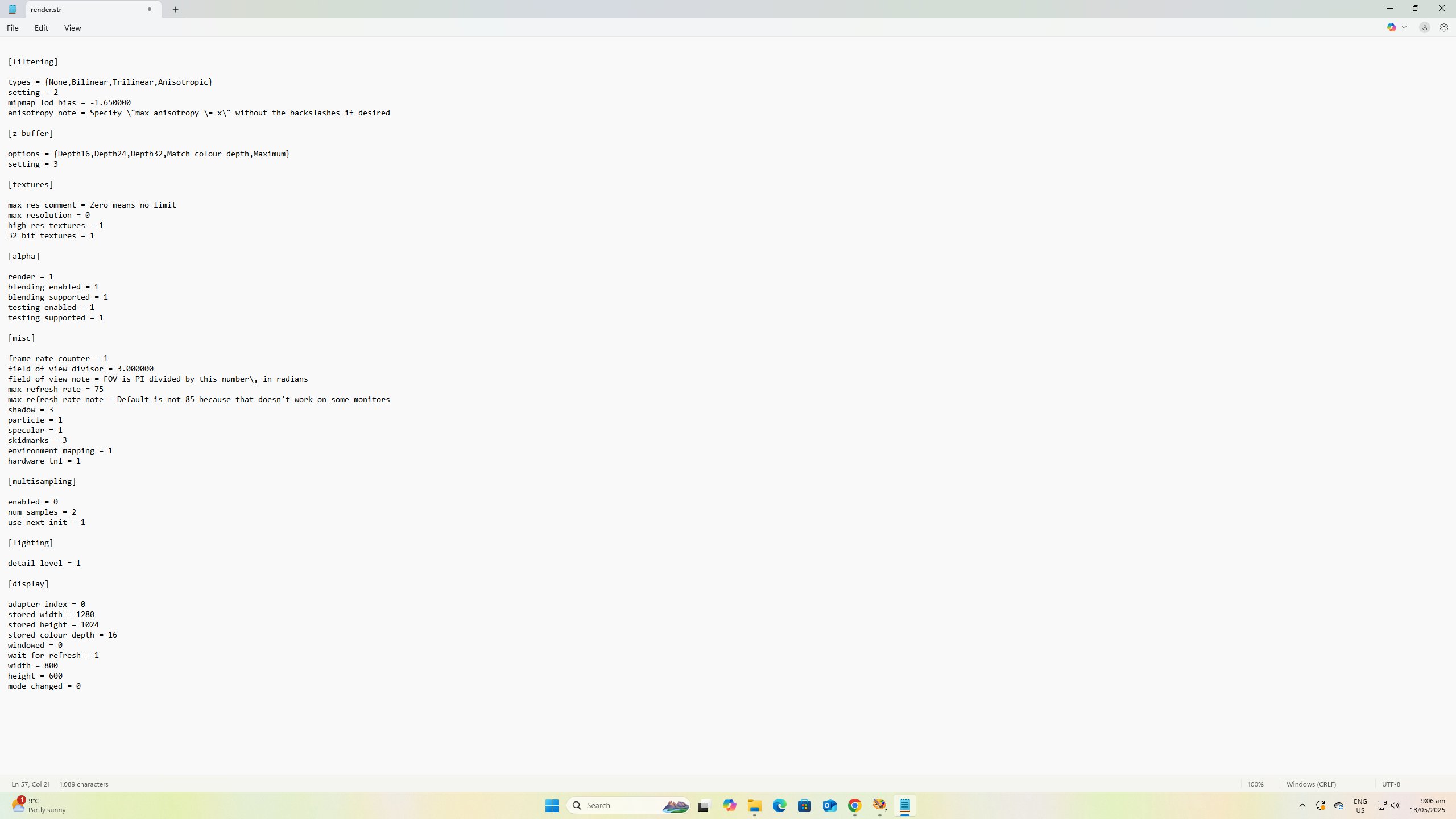
Morning Shock.... and Darren..... I first tried to fire up DTR2 first thing and it refused stating it requires DiectX 8.... I did alter the Date Render in Data in notepad and again adjusted frame size. Have a shot of the screen.... The 32bit I won't be able to sort if I can't access game.

Oh and it is in C drive under Games as usual.
Attachments:

Please Log in or Create an account to join the conversation.

Last edit: by Paul D kiwi.

Importing other tracks into DTR2! 1 year 5 days ago #75630

[display]

adapter index = 0
stored width = 1280
stored height = 960
stored colour depth = 32
windowed = 0
wait for refresh = 0
width = 640
height = 480
mode changed = 0
colour depth = 16
changed = 1

thats what have for mine ummmm hmmmmm
The following user(s) said Thank You: Paul D kiwi

Please Log in or Create an account to join the conversation.

Importing other tracks into DTR2! 1 year 5 days ago #75631

Much appreciate that Darren... Sadly it's expecting me to update my drivers to DirectX 8... I have DL'd and finding how to install it, not sure.... Not use to this goofy Windows10 but oh well.... We all have to grow up sometime.

I did take those numbers you shared and I have applied it to the Render file but still no show.

Please Log in or Create an account to join the conversation.

Last edit: by Paul D kiwi.

Importing other tracks into DTR2! 1 year 5 days ago #75632

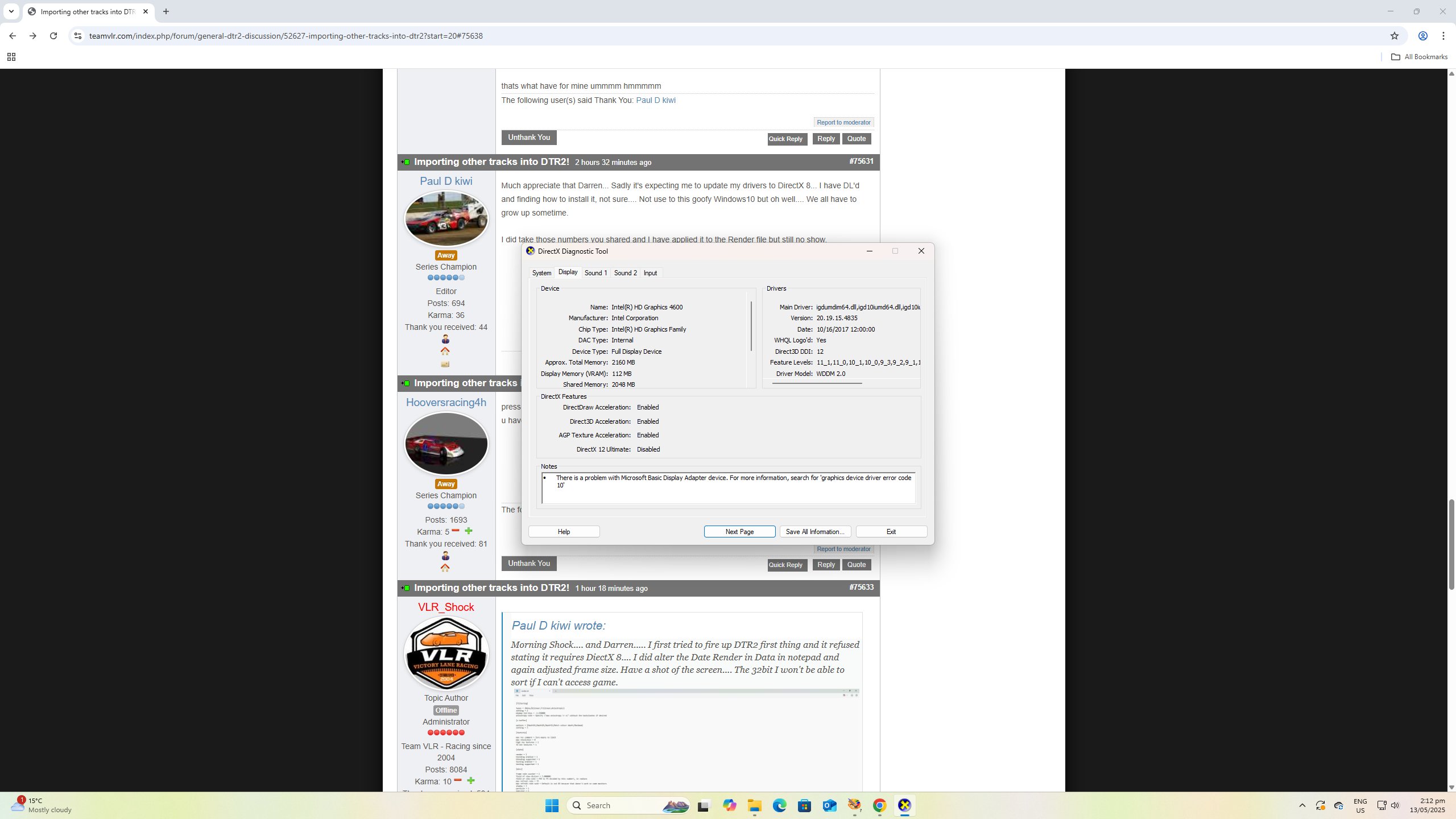
press windows then r key hit run icone then copy this dxdiag enter and bring up box with system info if u have direct x it will show at bottom of info let me know what tells u ?
The following user(s) said Thank You: Paul D kiwi

Please Log in or Create an account to join the conversation.

Importing other tracks into DTR2! 1 year 5 days ago #75633

  • VLR_Shock
  • VLR_Shock's Avatar Topic Author
  • Offline
  • Administrator
  • Administrator
  • Team VLR - Racing since 2004
  • Posts: 8115
  • Karma: 10
  • Thank you received: 512

Morning Shock.... and Darren..... I first tried to fire up DTR2 first thing and it refused stating it requires DiectX 8.... I did alter the Date Render in Data in notepad and again adjusted frame size. Have a shot of the screen.... The 32bit I won't be able to sort if I can't access game.

Oh and it is in C drive under Games as usual.

Try changing the stored colour depth to 32.
Team VLR - Racing since 2004

Please Log in or Create an account to join the conversation.

Importing other tracks into DTR2! 1 year 5 days ago #75634

I managed to do the 32bit on render file... Darren, thankyou for that clever info.... My driver is disabled and that's a DirectX 12.... I have to get no8 in there which I have in my DL's... Will take the chance and try to run it onto HDrive.

Please Log in or Create an account to join the conversation.

Importing other tracks into DTR2! 1 year 5 days ago #75635

i run windows 10 thats what i have 12 it will work with 12 driver for what ?

Please Log in or Create an account to join the conversation.

Importing other tracks into DTR2! 1 year 5 days ago #75636

I see it in the driver section Directx 12 but it's disabled.... I should yes.., find out why it is... We were told that someone before us put in their own Graphics selection which there is a hole on back of this Dell PC.... No idea what they got up to.... Maybe if DX12 was running it just might work so let me have a go again.

Please Log in or Create an account to join the conversation.

Importing other tracks into DTR2! 1 year 5 days ago #75637

shock do u know how enable dirext x thats out my area srry paul ill do resarch
The following user(s) said Thank You: Paul D kiwi

Please Log in or Create an account to join the conversation.

Importing other tracks into DTR2! 1 year 5 days ago #75638

Thanks for ur Help... I'll keep trying tho.

Don't know if this hjelps... took ages to remember how to get imto it. Can't see how to change anything. Help...!!!!!
Attachments:

Please Log in or Create an account to join the conversation.

Last edit: by Paul D kiwi.
Moderators: BLS_34
Time to create page: 0.113 seconds

Who's Online?

We have 44 guests and no members online