Monday, May 18, 2026
Welcome, Guest
Username: Password: Remember me
  • Page:
  • 1

TOPIC:

Windows 11 help 10 months 2 weeks ago #75763

  • Blake28
  • Blake28's Avatar Topic Author
  • Offline
  • Street Stock
  • Street Stock
  • Posts: 39
  • Thank you received: 0
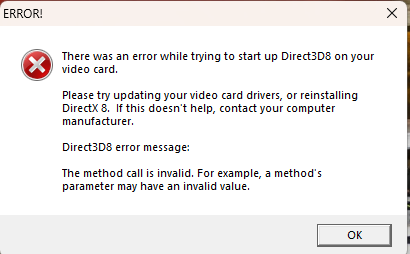
Hello all hope everyone is doing good, just seeing if anyone has ever had this issue and figured out what to do. I have ran the game in all the compatibility modes, enabled directplay on my laptop, changed my laptops resolution settings, and nothing helps.. this happens when i try to boot up dtr2 but it never even makes it to the menu... any help would be appreciated thanks !
Attachments:

Please Log in or Create an account to join the conversation.

Windows 11 help 10 months 2 weeks ago #75766

  • VLR_Shock
  • VLR_Shock's Avatar
  • Offline
  • Administrator
  • Administrator
  • Team VLR - Racing since 2004
  • Posts: 8115
  • Karma: 10
  • Thank you received: 512
Hey man, try to download dxvoodoo and play with teh settings in that program.

OR, easier is probably to try DXwnd. YOu can look up how to load the game in those
Team VLR - Racing since 2004

Please Log in or Create an account to join the conversation.

Windows 11 help 10 months 1 week ago #75771

  • Blake28
  • Blake28's Avatar Topic Author
  • Offline
  • Street Stock
  • Street Stock
  • Posts: 39
  • Thank you received: 0
I tried both of those programs and have got the game to open with both but every time i try to race neither programs work no matter what settings i change

Please Log in or Create an account to join the conversation.

Windows 11 help 10 months 1 week ago #75772

What card you got?

Please Log in or Create an account to join the conversation.

  • Page:
  • 1
Moderators: BLS_34
Time to create page: 0.050 seconds

Who's Online?

We have 34 guests and no members online