So I've scavenged around the internet like mad searching for something like a pre-installed ZIP file for this game and came up short. It's abandonware as far as I know so no physical disks are available anymore (which wouldn't matter, my PC doesn't possess a physical disk drive). I was able to find a pre-installed pack for the original DTR rather easily (My Abandonware site), and of course one for DTR2 right here on TeamVLR. The PC, despite being a Win 10, runs those two games without any flaw, so it's safe to assume it would do the same for DTRSC.
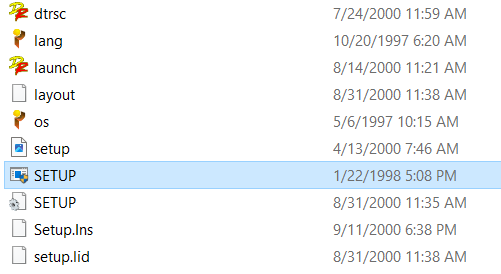
Problem is I can't run the install setup after mounting the ISO image. It doesn't come up as an 'error' or anything, I just click the SETUP.EXE, the 'hourglass' icon next to my clicker appears indicating it's processing on booting up the installer, but then it (the hourglass icon) disappears without anything else happening. I (believably) tried every trick in the book, virtual machines, DOSBox, Compatibility Mode to no avail on getting this installer to run. I understand it may seem silly being so *hellbent* on getting this game installed, but trust me it's frustrating after so long!
If any of y'all that remain on here are willing to help out, I'll greatly appreciate it.
P.S. Clicking 'launch' and selecting 'INSTALL DTRSC' returns an "Error spawning installation programme" message.